I search entire internet for a explanation of error "undefined reference to" functions inside static library, but no explicit solution found.
For users that he cannot resolve this issue I will post two photos, how to set up the project to import functions from static libraries.
In this case the .h files is inside the "Directories" (photo2) and the .a files inside the "Debug" folder of each static library project(how is shown on bottom of first photo).
When you compile a static library the compiler generates a file named "libProjectName.a" on "Debug" folder, on top of first photo is shown how can be included the .a libraries, to include .a libraries is necessary to write the .a file name without "lib" and without ".a"inside a quote ("").
With this setup you can include and use static library.
On this blog I try to do projects and post the most visited projects can be found on the Internet ( Only my creation )
Tuesday, February 7, 2012
Tuesday, January 24, 2012
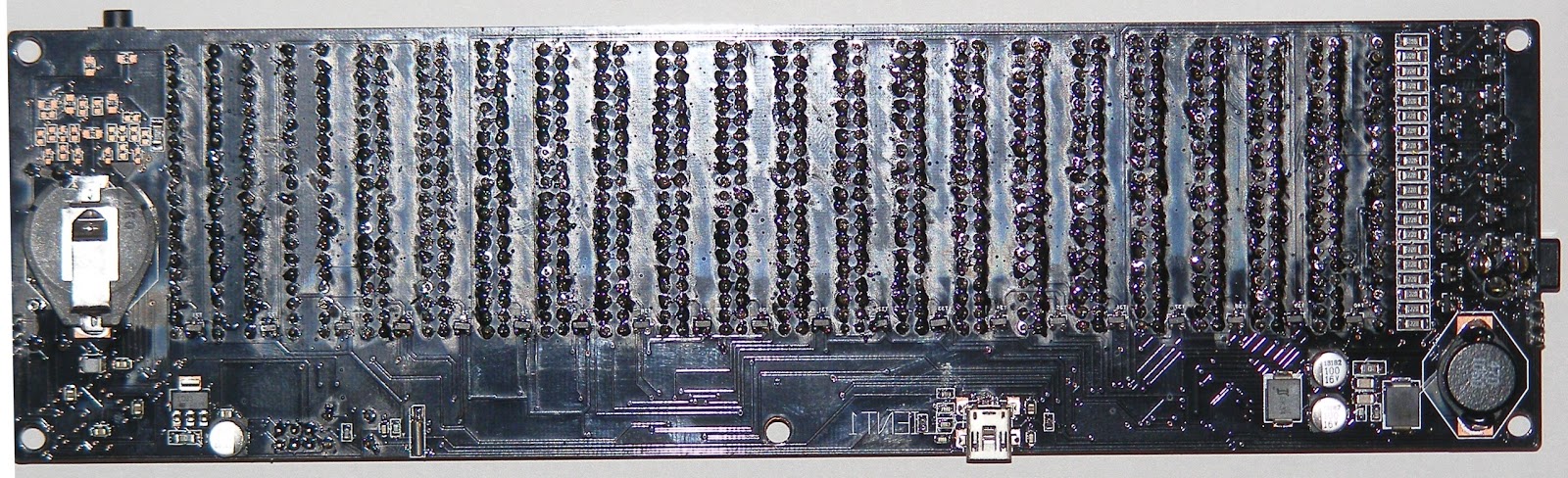
Stereo digital audio spectrum analyzer V4.0
This version has multiple changes from the previous version, like:
V 4.0A is a version with 18 Bands + Two VU meters for right and left channels.
- Can handle stereo signals.
- Display format is 18+1+1( to display 18 bands of frequencies and Left Right signal level) .
- USB adapter for easy upgrade.
- Dedicated RTC with battery back-up.
- Added two usart connectors to create cascade spectrum analyzers( to create large display from boards like this ).
- A microcontroller twice faster that previous and multiple hardware advantages that increase speed of signal processing and display rendering.
V 4.0B is a version with 20Bands.
A 3D presentation of Audio Spectrum Analyzer 4.0B:
Sunday, September 11, 2011
MikroMMB for Xmega MP3 Player
This project is created in AVR GCC with 100% my own drivers and libraries , this player can play MP3, WMA and OGG files from micro SD/SDHC memory card fat16/32 formatted.
V1.3
On this firmware I made some bug fixes and I adding some functions to player:
Bug fixes:
V1.2
On this version I made some changes:
Download V1.2 demo version of this player.
On this firmware I made some bug fixes and I adding some functions to player:
Bug fixes:
- The previous versions has a bug that forces user to put on first location of root directory the volume ID or a file or folder with the short name only.
Function's added:
- A progress bar to track the melody, with the same progress bar the user can force the audio player to play file from a specified point.
- Player can run now like a thread "Open player" "Close Player" when card is inserted is automatically opened the player, when SD card is removed all resources used by Audio Player will be freed.
- Now you can play music from SD/SDHC card's formatted in FAT16 or FAT32(The FAT16 has a little bug, on root directory is displayed only files and directory's from first Page(512Bytes).
On this version you can play: MP3, AAC, OGG, WAV and WMA.
V1.2
On this version I made some changes:
- I change the navigation from the "next" "previous" button to a list box.
- On this version is not capable to display bitmap's because I want to design another interface to view bitmap photo.
- The VS chip data is send by a service that work inside the RTC interrupt service, in this case has a high priority to send data to VS chip.
Download V1.2 demo version of this player.
V1.1
On this version I made huge improvements.
- Now you can navigate through the directories when you listen music, you can choose another melody when you listen another melody.
- The player has change the listen melody with the next from the current directory, the payback is stopped after the last melody is played.
- Now you can see bitmaps images in 8, 24 and 32 bit/pixel with some limitations, maximum size 240x200pixels, the maximum file size 140KB (140000bytes), the 240x200 pixels limitation is implemented to no interference with the player interface, the 140KB limitation is made because I have a bug in the bitmap library, that can't read files bigger than this value.
This version is limited to play only MP3 files, the core clock is 32Mhz.
V1.0
The controller is running at 16Mhz.
On this version can't manage the power consumption.
This version can play MP3, WMA and OGG.
Etichete:
ATXmega,
Fat32,
MicroSD,
MikroMedia,
MokroMMB,
MP3,
MP3 Player,
Player,
Sd/Mmc,
TFT Display,
VS1053,
Xmega
Tuesday, August 16, 2011
Mikro Media for Xmega simple Lcd Touch Paint
This is made with 100% my library's developed in AVR GCC because free source code for LCD display and touch screen can't be found on internet.
When you power up the board with this firmware, the board enter to touch screen calibrate, in four points, after the last point is touched the display is painted with white back ground and you can scribe through touch screen with chosen color touching the colors rectangles from right up of display.
Chosen color will appear like a rectangle painted with the same chosen color on right down of display.
If you want to clear the display, touch the black rectangle from right down of screen.
V1.1
In this firmware I add function to choose ink color and to clear display.
On this version is eliminated the previous described bug.
V1.0
On the 1.0 firmware version is a bug caused by the capacitors connected in parallel with Q5 and Q9 that is not filtered by the firmware, but for the current work is not a critical bug :D.
ATxmega boot loader
Currently I bought a Micromedia Board ( microMMB for XMEGA ) from mikroEelektronika.
This board is perfect for general developing because can be used by programmers that don't have a programmer, because is coming with a bootloader pre-installed.
I mentioned only the bootloader because this bootloader is the problem
To upload a flash with 64KB size is taken about 10-15 minutes, or to develop a firmware is a very very long time to wait, visualizing this I developed a very fast bootloader to write only Flash and EEProm memory, only strictly necessary memories because all of other ATxmega features can be set from uploaded firmware.
In this stage I compiled eight bootloader firmwares only for ATxmega128A1 for each used hardware usart, and each firmware work with a 256000 baud transfer rate, this baud rate is set like default baud rate for the up-loader when is opened, I want to mention that the up-loader can work with atmega bootloader firmwares found here.
Version 1.0 of firmwares:
For usart 6 ( usart F0 ). can be used for Micromedia Board for XMEGA.
Etichete:
ATXmega,
ATXmega128A1,
boot loader,
Microcontroller,
Xmega
Tuesday, May 17, 2011
Multipurpose development board with ATxmega64A1 / ATxmega128A1
- Main processing unit ATxmega64A1 or ATxmega128A1.
- Audio decoder VS1011,1033,1053 with stereo jack 3.5mm female connector & external speakers 3 pin connector(optional).
- DS1307 real time clock with battery pads.
- PDI & JTAG connectors.
- LB1936 dual driver for asynchronous motors (optional).
- AD7414 temperature sensor for motor driver (optional).
- External motors driver connector with I2C bus.
- Two micro SD connectors ( one is optional ).
- Four connectors with 2x3 pin to control eight servo motors, two servomotors for each connector, each connector is power interruption to minimize power consumption.
- Two power jack connector 5.5/2.1mm put in series to connect two photovoltaic panels and with static commutator controlled by software to charge main accumulator.
- High power step down stabilizer from accumulator voltage to 3.3V.
- On-board 512KB static ram for minimizing power consumption in sleep mode.
- BTM-222 Bluetooth for communication with PC or mobile phones (optional).
- RFM12BP at 434Mhz for communication with one remote control for huge distance up to 5Km (optional).
- RFM12BS at 868Mhz to control other wireless modules (optional).
- All modules from point 13, 14 & 15 can work at the same time without interferences.
- Five connectors with four pins with I2C bus and 3.3V power for future extensions.
- External extension bus connector to connect future external modules to ATxmega parallel data bus, such as Displays, more motors controllers, image sensors etc.
- Possibility to monitor power consumption from main accumulator.
- Possibility to monitor generated power by the photovoltaic panels.
- Possibility to monitor voltage of the main accumulator.
- Possibility to monitor power consumption of each motor powered by on-board driver.
- Robots: contain on-board dual asynchronous motor driver and four connectors to control eight servomotors, powered from an Li-Ion accumulator and support to charge the accumulator from two photovoltaic cells or from an external source, several communication modules: Bluetooth Class1, EFM12BP for long distance communication up to 5Km and RFM12BS for low power and short distance communication up to 300m.
- Audio player: contain on-board VS1011, VS1033 or VS1053, single or dual micro-SD memory card connectors with push.
- Audio/Video(low quality) player.
- General development application because has all possibility to connect with another controller or another peripherals to the expansion bus, the expansion connector work to speed of the external ram memory, because the expansion peripherals is mapped to address space 524288 to 1048576, maximum number of expansion peripherals is 65536.
Power supply input between 3.4V and 9.5V
Maximum supported input voltage on photovoltaic connectors and the main accumulator: 9.5V, Maximum absolute 10.5V.
Board dimension: 66.83 x 130.78mm.
Friday, February 25, 2011
Intel HEX to binary HEX converter
This is an utility for programmers to convert Intel .hex files generated by AVR studio for example to binary hex data file, to create static or dynamic library like image of flash ROM and can be imported like data file to a project.
V1.0.5In this version the files that is not modified ,is not recompiled, in this case if you work on memory stick not take the number of writings / deletions of memory stick for files that is not modified, or if you work with many files will not be useless to compile the files were not changed
This version can be downloaded from here.
V1.0.4In this version I added to automatically put the "#ifndef FileName" to include only one time a library if is declared on multiple files.
This version can be downloaded from here.
V1.0.3
Added:
Now can include header file with definition constants in hex image file, in this case is no longer case to include hex image file and header file separately, you can include only hex image file, if the name of .hex file is "AA.hex" the name of header file is necessary to be "AA_Headers.inc".
When hi finish to compile all files, auto close the thread, this feature allow to include this compiler on Pre Assembling section of AVR Studio, in this case before the compilation of AVR studio, AVR Studio can launch this compiler to actualize the images of libraries, and after can compile the project with updated libraries.
Fix:
On start up auto load the path where is.
This version can be downloaded from here.
V1.0.2
Fix: no filter to .hex in 1.0.1 version.The last version of this utility can be downloaded from here (Internet explorer only).
V1.0.1
New:
Added:
V1.0.0
This utility get all of the .hex files from directory that the utility has been opened /source and put converted files include directory structure to /bin.
For example the project is placed to C:/source/, and the utility in C:/
The directory structure is this:
C:/source/Math.hex
C:/source/IO_Port_Driver.hex
C:/source/IO_Uart_Driver.hex
After running of the utility all files is compiled on C:/bin/ and well see like that:
C:/bin/Math.asm
C:/bin/IO_Port_Driver.asm
C:/bin/IO_Uart_Driver.asm
The result is files .asm with data in hex format.
To create static or dynamic library's is necessary to put links to the integrated functions on top of the library, for example:
File: Math.asm
.Org 0
MathLibrary: // This is the base address of the links
Rjmp Add8x8_8
Rjmp Add16x16_16
Rjmp Add 32x32_32
Rjmp Sub 8x8_8
Rjmp Sub 16x16_16
Rjmp Sub 32x32_32
;--------------------------------//End of links
//Begin of routines
Add8x8_8:
Code......
Ret
;--------
Add16x16_16:
Code......
Ret
;--------
Add32x32_32:
Code......
Ret
;--------
Sub8x8_8:
Code......
Ret
;--------
Sub16x16_16:
Code......
Ret
;--------
Sub32x32_32:
Code......
Ret
;--------
//End of library
To define the offsets of links you can create another file with this, for example:
File: Math.inc
#define _MathLibrary (0) //Offset of base of links
#define _Add8x8_8 (0) //Link 1
#define _Add16x16_16 (1) //Link 2
#define _Add32x32_32 (2) //Link 3
#define _Sub8x8_8 (3) //Link 4
#define _Sub16x16_16 (4) //Link 5
#define _Sub32x32_32 (5) //Link 6
To import a library, on end of main file include "Math.asm" file from bin directory.
For example:
_MathLibrary_:
.Include "Math.asm"
All of the function from this library can be called like that:
Rcall _MathLibrary_ + _MathLibrary + _Sub8x8_8
Or if "_MathLibrary" base address of links is 0:
Rcall _MathLibrary_ + _Sub8x8_8
"_MathLibrary_" is address of the imported library assigned by the compiler when you build the project, and "_Sub8x8_8" is the offset of the link of the included routine in library defined in
"Math.inc"
V1.0.5In this version the files that is not modified ,is not recompiled, in this case if you work on memory stick not take the number of writings / deletions of memory stick for files that is not modified, or if you work with many files will not be useless to compile the files were not changed
This version can be downloaded from here.
V1.0.4In this version I added to automatically put the "#ifndef FileName" to include only one time a library if is declared on multiple files.
This version can be downloaded from here.
V1.0.3
Added:
Now can include header file with definition constants in hex image file, in this case is no longer case to include hex image file and header file separately, you can include only hex image file, if the name of .hex file is "AA.hex" the name of header file is necessary to be "AA_Headers.inc".
When hi finish to compile all files, auto close the thread, this feature allow to include this compiler on Pre Assembling section of AVR Studio, in this case before the compilation of AVR studio, AVR Studio can launch this compiler to actualize the images of libraries, and after can compile the project with updated libraries.
Fix:
On start up auto load the path where is.
This version can be downloaded from here.
V1.0.2
Fix: no filter to .hex in 1.0.1 version.The last version of this utility can be downloaded from here (Internet explorer only).
V1.0.1
New:
Added:
- On program open you can choose the base directory where is the source folder.
- You can always change the working directory.
- Automatic checking and downloading updates.
V1.0.0
This utility get all of the .hex files from directory that the utility has been opened /source and put converted files include directory structure to /bin.
For example the project is placed to C:/source/, and the utility in C:/
The directory structure is this:
C:/source/Math.hex
C:/source/IO_Port_Driver.hex
C:/source/IO_Uart_Driver.hex
After running of the utility all files is compiled on C:/bin/ and well see like that:
C:/bin/Math.asm
C:/bin/IO_Port_Driver.asm
C:/bin/IO_Uart_Driver.asm
The result is files .asm with data in hex format.
To create static or dynamic library's is necessary to put links to the integrated functions on top of the library, for example:
File: Math.asm
.Org 0
MathLibrary: // This is the base address of the links
Rjmp Add8x8_8
Rjmp Add16x16_16
Rjmp Add 32x32_32
Rjmp Sub 8x8_8
Rjmp Sub 16x16_16
Rjmp Sub 32x32_32
;--------------------------------//End of links
//Begin of routines
Add8x8_8:
Code......
Ret
;--------
Add16x16_16:
Code......
Ret
;--------
Add32x32_32:
Code......
Ret
;--------
Sub8x8_8:
Code......
Ret
;--------
Sub16x16_16:
Code......
Ret
;--------
Sub32x32_32:
Code......
Ret
;--------
//End of library
To define the offsets of links you can create another file with this, for example:
File: Math.inc
#define _MathLibrary (0) //Offset of base of links
#define _Add8x8_8 (0) //Link 1
#define _Add16x16_16 (1) //Link 2
#define _Add32x32_32 (2) //Link 3
#define _Sub8x8_8 (3) //Link 4
#define _Sub16x16_16 (4) //Link 5
#define _Sub32x32_32 (5) //Link 6
To import a library, on end of main file include "Math.asm" file from bin directory.
For example:
_MathLibrary_:
.Include "Math.asm"
All of the function from this library can be called like that:
Rcall _MathLibrary_ + _MathLibrary + _Sub8x8_8
Or if "_MathLibrary" base address of links is 0:
Rcall _MathLibrary_ + _Sub8x8_8
"_MathLibrary_" is address of the imported library assigned by the compiler when you build the project, and "_Sub8x8_8" is the offset of the link of the included routine in library defined in
"Math.inc"
Etichete:
AVR Studio,
BinHex,
Converter,
IntelHex,
utility
Sunday, February 20, 2011
Development board 1 for ATXMEGA A1 microcontrollers
This is a very simple board to test and develop firmwares for ATXMEGA A1 micro-controllers.
This board contains only strictly necessary components for the ATXMEGA A1 micro-controller and only one extra module is added, the USB to serial adapter, the rest of modules can be added to a mother board.
This board has 89x74mm.


This is a very simple board to test and develop firmwares for ATXMEGA A1 micro-controllers.
This board contains only strictly necessary components for the ATXMEGA A1 micro-controller and only one extra module is added, the USB to serial adapter, the rest of modules can be added to a mother board.
This board has 89x74mm.
You can download gerber files and schematic from here.
This board contains only strictly necessary components for the ATXMEGA A1 micro-controller and only one extra module is added, the USB to serial adapter, the rest of modules can be added to a mother board.
This board has 89x74mm.
This is a very simple board to test and develop firmwares for ATXMEGA A1 micro-controllers.
This board contains only strictly necessary components for the ATXMEGA A1 micro-controller and only one extra module is added, the USB to serial adapter, the rest of modules can be added to a mother board.
This board has 89x74mm.
You can download gerber files and schematic from here.
Monday, July 5, 2010
NGW100 AVR32 SDK modified from tolchain216
I recently started programming for avr32, for this reason I bought a motherboard NGW100, searching the internet for AVr32 AP7000 documentation I found the package libraries and drivers tolchain216, looking through it I noticed that this is not too arranged, so i begin to arrange libraries and drivers by category and the result can be downloaded below.
NGW100 AVR32 SDK from tolchain216 V1.0
Thursday, May 20, 2010
Mp3 player with ATmega64, Vs1011 & Samsung E700 display
This MP3 player is an upgrade to this player . New in this player is a new nice interface with bitmaps from media player windows 7 and windows 7 battery icons.
I preferred to use bitmaps for interface because in future i want to be possible to change the skin interface from SD card, in this case is more simple to create skins for this player.
V1.0.1A
A little correction for used times for back light, keyboard and battery showing.
Download MP3 PlayerV1.0.1A
V1.0.1
This version player is made to use ASM_SDK V1.0.4 and prepared to work with multiple opened files.
Download MP3_PlayerV1.0.1
From here you can download ASM_SDK.
With ASM_SDK 1.0.5 or newest version you can play from SDHC high capacity > 4GB, at the frequency of only 6 MHz you can play 320Kb/s bit rate melody's.
V1.0.0From here you can download the first source code for this player.To compile this player is necessarily to download and include ASM SDK from here, this version is made to use ASM_SDK V1.0.3.
I preferred to use bitmaps for interface because in future i want to be possible to change the skin interface from SD card, in this case is more simple to create skins for this player.
V1.0.1A
A little correction for used times for back light, keyboard and battery showing.
Download MP3 PlayerV1.0.1A
V1.0.1
This version player is made to use ASM_SDK V1.0.4 and prepared to work with multiple opened files.
Download MP3_PlayerV1.0.1
From here you can download ASM_SDK.
With ASM_SDK 1.0.5 or newest version you can play from SDHC high capacity > 4GB, at the frequency of only 6 MHz you can play 320Kb/s bit rate melody's.
V1.0.0From here you can download the first source code for this player.To compile this player is necessarily to download and include ASM SDK from here, this version is made to use ASM_SDK V1.0.3.
Thursday, May 6, 2010
Micro Hex Bootloader for ATmega microcontrollers
New in 1.1 version:
The boot loader from microcontroller can report 5 different errors:
From this moment the source code is ready to download for free.
To compile this boot loader is necessarily to use last ASM SDK.
This Bootloader has maximum 512Words(1KB) of flash and can work on controllers listened down:
ATmega48 Not Tested
ATmega48P Not Tested
Atmega8 Not Tested
Atmega8A Not Tested
ATmega88 Not Tested
ATmega88A Not Tested
ATmega88PA Not Tested
ATmega16 Not Tested
ATmega16A Not Tested
ATmega162 Not Tested
ATmega168 Not Tested
ATmega168A Not Tested
ATmega168PA Not Tested
ATmega32 Not Tested
ATmega32A Not Tested
ATmega64 OK
ATmega64A Not Tested
ATmega640 Not Tested
ATmega128 OK
ATmega128A Not Tested
ATmega1281 Not Tested
ATmega1280 Not Tested
ATmega2561 Not Tested
ATmega2560 Not Tested
Download Bootloader V1.1 ASM Source code and PC uploader C# source code.
First version V1.0
This is an utility that eliminate the ISP programmer for ATmega Microcontrollers and he work even on Windows Vista and Windows 7.
This boot loader is created to upload data in hex format no bin like others boot loaders, to convert from hex to bin is used an function integrated in boot loader not in up loader.
Version ( V1.0 ) is capable to write flash and eeprom (.hex and .eep) generated by AVR Studio and AVR GCC.
The .eep file is detected automatically by the program from the name of .hex file, for this reason is necessarily to select only .hex file.
When this boot loader is present on an ATmega microcontroller ,at reset is booting in boot loader and is programed to stay and wait for "BootInit" + Cr for entering in programed mode for 2 seconds, if "BootInit" + Cr is not received the boot loader jumps to address 0 in flash.
If communication is interrupted more than 2 seconds this boot loader jump to address 0 of flash.
The boot loader from microcontroller can report 4 different errors that can be appear:
Flash = 952 Bytes For Uart1 ( The fusible for jumping in boot loader is necessarily to set to 512 Words ).
Down is ready to download 2 Hex demo files that contain the boot loader for ATmega64 at 16Mhz and 8Mhz at Baud rate 19200b/s for Uart1
Download PC uploader V1.0
Download BootLoader for ATmega64 8Mhz Uart1 19200b/s V1.0
Download BootLoader for ATmega64 16Mhz Uart1 19200b/s V1.0
The boot loader from microcontroller can report 5 different errors:
- LineDefError = One line is not have the defined destination.
- SecondHexCharNotFound = If first hex char is found but second hex char is not found or is not one hex char.
- CheckSum = If in one line is detected one check sum error.
- LineMismach = After conversion from hex to bin If total length line - 5 is not equal to data bytes contained by that line.
- NoMemorySelected = If user is trying to write in memory but the user is not sends the command to select Flash or EEProm memory.
- Flash = 852 Bytes For Atmega8( The fusible for jumping in boot loader is necessarily to set to 512 Words ).
- Flash = 860 Bytes For Uart0 Atmega64-128( The fusible for jumping in boot loader is necessarily to set to 512 Words ).
- Flash = 878 Bytes For Uart1 Atmega64-128( The fusible for jumping in boot loader is necessarily to set to 512 Words ).
From this moment the source code is ready to download for free.
To compile this boot loader is necessarily to use last ASM SDK.
This Bootloader has maximum 512Words(1KB) of flash and can work on controllers listened down:
ATmega48 Not Tested
ATmega48P Not Tested
Atmega8 Not Tested
Atmega8A Not Tested
ATmega88 Not Tested
ATmega88A Not Tested
ATmega88PA Not Tested
ATmega16 Not Tested
ATmega16A Not Tested
ATmega162 Not Tested
ATmega168 Not Tested
ATmega168A Not Tested
ATmega168PA Not Tested
ATmega32 Not Tested
ATmega32A Not Tested
ATmega64 OK
ATmega64A Not Tested
ATmega640 Not Tested
ATmega128 OK
ATmega128A Not Tested
ATmega1281 Not Tested
ATmega1280 Not Tested
ATmega2561 Not Tested
ATmega2560 Not Tested
Download Bootloader V1.1 ASM Source code and PC uploader C# source code.
First version V1.0
This is an utility that eliminate the ISP programmer for ATmega Microcontrollers and he work even on Windows Vista and Windows 7.
This boot loader is created to upload data in hex format no bin like others boot loaders, to convert from hex to bin is used an function integrated in boot loader not in up loader.
Version ( V1.0 ) is capable to write flash and eeprom (.hex and .eep) generated by AVR Studio and AVR GCC.
The .eep file is detected automatically by the program from the name of .hex file, for this reason is necessarily to select only .hex file.
When this boot loader is present on an ATmega microcontroller ,at reset is booting in boot loader and is programed to stay and wait for "BootInit" + Cr for entering in programed mode for 2 seconds, if "BootInit" + Cr is not received the boot loader jumps to address 0 in flash.
If communication is interrupted more than 2 seconds this boot loader jump to address 0 of flash.
The boot loader from microcontroller can report 4 different errors that can be appear:
- LineDefError = One line is not have the defined destination.
- SecondHexCharNotFound = If first hex char is found but second hex char is not found or is not one hex char.
- CheckSum = If in one line is detected one check sum error.
- LineMismach = After conversion from hex to bin If total length line - 5 is not equal to data bytes contained by that line.
Flash = 952 Bytes For Uart1 ( The fusible for jumping in boot loader is necessarily to set to 512 Words ).
Down is ready to download 2 Hex demo files that contain the boot loader for ATmega64 at 16Mhz and 8Mhz at Baud rate 19200b/s for Uart1
Download PC uploader V1.0
Download BootLoader for ATmega64 8Mhz Uart1 19200b/s V1.0
Download BootLoader for ATmega64 16Mhz Uart1 19200b/s V1.0
Complete File to Hex converter
I've made this converter because I've searched on the internet looking for a converter that converts one file.bmp with header in decimal or hex and i didn't find it. This converter convert a file.bmp in a file.asm with all the additions ".db" for declaration constants.
The result file contains all the bytes converted without exception.
The name of the result file is: 'name of file converted.asm' for AvrASM ex: test.bmp is saved test.bmp.asm
Because I've been asked about a AvrGcc converter, i have created a program for converting in .h files
The name of the result file is: 'the name of file converted.h' for AvrGCC ex: test.bmp is saved test.bmp.h
This is the result for AvrASM:
This is the result for AvrGCC:
FileConverterToHexAvGCC_V1.1.zip
The result file contains all the bytes converted without exception.
The name of the result file is: 'name of file converted.asm' for AvrASM ex: test.bmp is saved test.bmp.asm
Because I've been asked about a AvrGcc converter, i have created a program for converting in .h files
The name of the result file is: 'the name of file converted.h' for AvrGCC ex: test.bmp is saved test.bmp.h
This is the result for AvrASM:
This is the result for AvrGCC:
FileConverterToHexAvGCC_V1.1.zip
Multifunctional 20 Band Audio Spectrum Analyzer V3.0.x
This project is a version 3 firmware and hardware upgrade spectrum analyzer with 20 audio band of 20 levels each and includes other functions and utilities improvements.
On future:
V3.2
On this update has been added AGC function(Automatic Gain Control), this function allow the spectrum analyzer to work with signals between 80 and 1000mV without external signal conditioner or external signal regulator.
This function can not be turned off from menu settings.
With this update you can download an update for PC client of the up-loader for this spectrum analyzer, please go here to download this software.
V3.1
Is renamed because is one big step from filters combined (digital & analog) to completely digital filtering.
Added functions:
V3.0.3
Added functions:
Functions:
![]() |
| From Digital electronics and programing |
![]() |
| From Digital electronics and programing |
On future:
- Option to put five, ten or more of this boards, each board filtering one frequency, rotated by ninety degrees to obtain large size of panel for disco or other purposes.
- Ability to display a text message received on the serial unit.
- Ability to display time during sleep.
- Function to adjust the signal level manually.
- Ability to wake up from standby function if signal input is detected.
- Ability to enter standby mode in the absence of input signal.
- Ability to export using the serial unit, the levels displayed on the local display.
V3.2
On this update has been added AGC function(Automatic Gain Control), this function allow the spectrum analyzer to work with signals between 80 and 1000mV without external signal conditioner or external signal regulator.
This function can not be turned off from menu settings.
With this update you can download an update for PC client of the up-loader for this spectrum analyzer, please go here to download this software.
V3.1
Is renamed because is one big step from filters combined (digital & analog) to completely digital filtering.
Added functions:
- Ability to enter in standby from menu.
- Change from help of analog circuits to filter audio bands to completely digital filtering bands, without the help of analog filtering circuits ( this improve the stability of the displayed bands ) .
V3.0.3
Added functions:
- Improve speed of way to display levels of frequencies 0,1 & 2.
- Ability to set the start-up light when is connected to power supply.
- Ability to set-up the horizontal way to display the levels of frequencies, normal or mirrored for stereo use, the way is memorized for start-up config.
Functions:
- Eleven different ways of displaying the levels of frequencies.
- Five modes(ways) of display luminance.
- Ability to set the star-up mode when is connected the power supply.
Wednesday, May 5, 2010
ASM SDK
V1.0.5Added functions:
-In "Drivers/IO_Driver_20x20LedDisplay.asm" non multiplexed 20x20 led display.
Options:
-In "Lib/Util.inc" Option to eliminate non used memory type.
Optimizations:
-In "System/SoftTimers.asm" optimized tick function.
-One important optimization on Fat32 FFS may allow programmers to work with allocation table management library and data management library fully dynamic, now with this optimization the use can mount infinite discs on single microcontroller, the limit is only the ram memory.
Added library:
-"System/Vectors.inc"is a macro functions to help programmers to place vectors more simply.
-"Drivers/IO_ADC.asm" and "IO_ADC.inc"is a generic driver to work with internal hardware ADC.
Bug fix:
-"IO_VS1011a.asm" fix an error that "VS1011GetBitrate" function return's 0 if the table of bitrate constant is called one part on Zh and another part on Zh+1
An example to use Fat32 FFS with multiple disks: _Fat32_IndexManagement_RamAlloc IndexManagementLibraryRamDisk1
_Fat32_IndexManagement_RamAlloc IndexManagementLibraryRamDisk2
_Fat32_DataManagement_RamAlloc RamToFat32DataPlayerDisk1
_Fat32_DataManagement_RamAlloc RamToFat32DataPlayerDisk2
_Fat32_Mount IndexManagementLibraryRamDisk1
_Fat32_Mount IndexManagementLibraryRamDisk2
_Fat32_SesionInit IndexManagementLibraryRamDisk1, RamToFat32DataPlayerDisk1
_Fat32_SesionInit IndexManagementLibraryRamDisk2, RamToFat32DataPlayerDisk2
On every change of working disks is necessary to point in Zl:Zh the data management library allocated ram like that: _Fat32_DataManagement_GetRamAddress RamToFat32DataPlayerDisk1
Code to work with this disk...................
_Fat32_DataManagement_GetRamAddress RamToFat32DataPlayerDisk2
Code to work with this disk...................
This is cool because you can copy one file from one disk to another.
With this new optimization you can open two or more files on same disk, one example is this: _Fat32_IndexManagement_RamAlloc IndexManagementLibraryRamDisk1
_Fat32_DataManagement_RamAlloc RamToFat32DataPlayerDisk1
_Fat32_DataManagement_RamAlloc RamToFat32DataPlayerDisk2
_Fat32_Mount IndexManagementLibraryRamDisk1
_Fat32_SesionInit IndexManagementLibraryRamDisk1, RamToFat32DataPlayerDisk1
_Fat32_SesionInit IndexManagementLibraryRamDisk1, RamToFat32DataPlayerDisk2
_Fat32_DataManagement_GetRamAddress RamToFat32DataPlayerDisk1
Code to work with this disk................... Get byte from file 1 _Fat32_DataManagement_GetRamAddress RamToFat32DataPlayerDisk2
Code to work with this disk................... Write byte to file 2
Download SDK 1.0.4
V1.0.3
-Added battery paint with 9 bitmap levels and charge bitmap,this function can be called from Dx.asm, before calling this function in R16 is necessarily to lead level:
.Dseg
TimeToEsantionBattery: .Byte 8; Reserve ram for this timer
TimeToTurnOffLight: .Byte 8; Reserve ram for this timer
.Cseg
Ldi R16,Low(1000); Hardware timer tick /1000
Ldi R17,Byte2(1000)
Ldi R18,Byte3(1000)
Ldi R19,Byte4(1000)
Ldi Yl,Low(TimeToEsantionBattery)
Ldi Yh,High(TimeToEsantionBattery)
CallLib _SoftTimer,_SoftTimer_Init
Ldi R16,Low(10000); Hardware timer tick /10000
Ldi R17,Byte2(10000)
Ldi R18,Byte3(10000)
Ldi R19,Byte4(10000)
Ldi Yl,Low(TimeToTurnOffLight)
Ldi Yh,High(TimeToTurnOffLight)
CallLib _SoftTimer,_SoftTimer_Init
Main:
Wdr
Ldi Yl,Low(TimeToTurnOffLight)
Ldi Yh,High(TimeToTurnOffLight)
CallLib _SoftTimer,_SoftTimer_Tick
Rcall TurnOffLight
Ldi Yl,Low(TimeToEsantionBattery)
Ldi Yh,High(TimeToEsantionBattery)
CallLib _SoftTimer,_SoftTimer_Tick
Rcall EsantionBattery
Rjmp Main
TurnOffLight:
; Routine to execute tick
Ret
EsantionBattery:
; Routine to execute tick
Ret
To disable one timer use this example:
Ldi Yl,Low(TimeToTurnOffLight)
Ldi Yh,High(TimeToTurnOffLight)
CallLib _SoftTimer,_SoftTimer_Disable
To enable one timer use this example:
Ldi Yl,Low(TimeToTurnOffLight)
Ldi Yh,High(TimeToTurnOffLight)
CallLib _SoftTimer,_SoftTimer_Enabled
This timers is enabled when is initiated.
Download SDK 1.0.3
V1.0.2-Added SDHC support in SD card driver,
-Added support for dynamically MBR location in Fat32 Filesystem library.
Download SDK 1.0.2
V1.0.1A
This litle update is a modification in Internal EEProm Driver file to work with more microcontrollers.
Download SDK 1.0.1A
V1.0.1
V1.0.0
This ASM SDK created by me is a group of library and drivers that contain:
Version 1.0
Drivers:
- "IO_Driver_20x20LedDisplay.asm" Added function "_PaintVerticalBarToVideoRamDnLeft" display one bar with R16 col pozition and R18 Length.
- "IO_Driver_20x20LedDisplay.asm" Added function "_PaintVerticalBarToVideoRamUpLeft" display one bar with R16 col pozition and R18 Length.
- "IO_Driver_20x20LedDisplay.asm" Added function "_SleepDisplay" to sleep display to deactivate scanning of matriceal display.
- "IO_Driver_20x20LedDisplay.asm" Added function "_WeekDisplay to resume from sleep.
- "IO_Driver_20x20LedDisplay.asm" Added function "_DisplaySecondaryRam" I added a secondary ram buffer to prevent flicker when you write to video ram.
- "IO_Driver_20x20LedDisplay.asm" Added function "_Display_TransferDataToDisplay_True" This allow to transfer data from secondary buffer to video ram buffer.
- "IO_Driver_20x20LedDisplay.asm" Added function "_Display_TransferDataToDisplay_False" This block transfersof data from secondary buffer to video ram buffer.
- "IO_Adc.inc" Added function ".Macro _Macro_Adc_Sleep" to sleep internal ADC.
- "IO_Adc.inc" Added function "_Macro_Adc_Week" to resume from sleep internal ADC.
- "IO_SdDriver.asm" Added support for SDHC High capacity > 4GB ( tested with one Kingston SDC4/16GB 02, MicroSD 16GB Class 4)
-In "Drivers/IO_Driver_20x20LedDisplay.asm" non multiplexed 20x20 led display.
Options:
-In "Lib/Util.inc" Option to eliminate non used memory type.
Optimizations:
-In "System/SoftTimers.asm" optimized tick function.
-One important optimization on Fat32 FFS may allow programmers to work with allocation table management library and data management library fully dynamic, now with this optimization the use can mount infinite discs on single microcontroller, the limit is only the ram memory.
Added library:
-"System/Vectors.inc"is a macro functions to help programmers to place vectors more simply.
-"Drivers/IO_ADC.asm" and "IO_ADC.inc"is a generic driver to work with internal hardware ADC.
Bug fix:
-"IO_VS1011a.asm" fix an error that "VS1011GetBitrate" function return's 0 if the table of bitrate constant is called one part on Zh and another part on Zh+1
An example to use Fat32 FFS with multiple disks: _Fat32_IndexManagement_RamAlloc IndexManagementLibraryRamDisk1
_Fat32_IndexManagement_RamAlloc IndexManagementLibraryRamDisk2
_Fat32_DataManagement_RamAlloc RamToFat32DataPlayerDisk1
_Fat32_DataManagement_RamAlloc RamToFat32DataPlayerDisk2
_Fat32_Mount IndexManagementLibraryRamDisk1
_Fat32_Mount IndexManagementLibraryRamDisk2
_Fat32_SesionInit IndexManagementLibraryRamDisk1, RamToFat32DataPlayerDisk1
_Fat32_SesionInit IndexManagementLibraryRamDisk2, RamToFat32DataPlayerDisk2
On every change of working disks is necessary to point in Zl:Zh the data management library allocated ram like that: _Fat32_DataManagement_GetRamAddress RamToFat32DataPlayerDisk1
Code to work with this disk...................
_Fat32_DataManagement_GetRamAddress RamToFat32DataPlayerDisk2
Code to work with this disk...................
This is cool because you can copy one file from one disk to another.
With this new optimization you can open two or more files on same disk, one example is this: _Fat32_IndexManagement_RamAlloc IndexManagementLibraryRamDisk1
_Fat32_DataManagement_RamAlloc RamToFat32DataPlayerDisk1
_Fat32_DataManagement_RamAlloc RamToFat32DataPlayerDisk2
_Fat32_Mount IndexManagementLibraryRamDisk1
_Fat32_SesionInit IndexManagementLibraryRamDisk1, RamToFat32DataPlayerDisk1
_Fat32_SesionInit IndexManagementLibraryRamDisk1, RamToFat32DataPlayerDisk2
_Fat32_DataManagement_GetRamAddress RamToFat32DataPlayerDisk1
Code to work with this disk................... Get byte from file 1 _Fat32_DataManagement_GetRamAddress RamToFat32DataPlayerDisk2
Code to work with this disk................... Write byte to file 2
Download SDK 1.0.4
V1.0.3
-Added battery paint with 9 bitmap levels and charge bitmap,this function can be called from Dx.asm, before calling this function in R16 is necessarily to lead level:
- BatteryEmpty
- Battery1
- Battery2
- Battery3
- Battery4
- Battery5
- Battery6
- Battery7
- BatteryFull
- BatteryCharge
.Dseg
TimeToEsantionBattery: .Byte 8; Reserve ram for this timer
TimeToTurnOffLight: .Byte 8; Reserve ram for this timer
.Cseg
Ldi R16,Low(1000); Hardware timer tick /1000
Ldi R17,Byte2(1000)
Ldi R18,Byte3(1000)
Ldi R19,Byte4(1000)
Ldi Yl,Low(TimeToEsantionBattery)
Ldi Yh,High(TimeToEsantionBattery)
CallLib _SoftTimer,_SoftTimer_Init
Ldi R16,Low(10000); Hardware timer tick /10000
Ldi R17,Byte2(10000)
Ldi R18,Byte3(10000)
Ldi R19,Byte4(10000)
Ldi Yl,Low(TimeToTurnOffLight)
Ldi Yh,High(TimeToTurnOffLight)
CallLib _SoftTimer,_SoftTimer_Init
Main:
Wdr
Ldi Yl,Low(TimeToTurnOffLight)
Ldi Yh,High(TimeToTurnOffLight)
CallLib _SoftTimer,_SoftTimer_Tick
Rcall TurnOffLight
Ldi Yl,Low(TimeToEsantionBattery)
Ldi Yh,High(TimeToEsantionBattery)
CallLib _SoftTimer,_SoftTimer_Tick
Rcall EsantionBattery
Rjmp Main
TurnOffLight:
; Routine to execute tick
Ret
EsantionBattery:
; Routine to execute tick
Ret
To disable one timer use this example:
Ldi Yl,Low(TimeToTurnOffLight)
Ldi Yh,High(TimeToTurnOffLight)
CallLib _SoftTimer,_SoftTimer_Disable
To enable one timer use this example:
Ldi Yl,Low(TimeToTurnOffLight)
Ldi Yh,High(TimeToTurnOffLight)
CallLib _SoftTimer,_SoftTimer_Enabled
This timers is enabled when is initiated.
Download SDK 1.0.3
V1.0.2-Added SDHC support in SD card driver,
-Added support for dynamically MBR location in Fat32 Filesystem library.
Download SDK 1.0.2
V1.0.1A
This litle update is a modification in Internal EEProm Driver file to work with more microcontrollers.
Download SDK 1.0.1A
V1.0.1
- Fat32file system Read and write with 3 modes of ram allocation. OK Doc RO
- BTM bluetooth driver. Not finished ( Some functions not proved )
- Samsung E700 TFT color display driver. OK Doc RO
- Nokia 6100 display driver. Not completed (No 24Bit ink support ) Doc RO
- HD44780 display driver. Not completed ( no optimization )
- External I2C EEProm driver. OK
- Internal eeprom driver. OK
- Macro eeprom driver. OK
- Joystick 5 direction driver. OK
- General IO utility driver. OK
- SD card driver in SPI mode. OK
- Hardware SPI driver Macro mode. OK
- Software SPI driver macro mode. Not tested
- Uart hardware driver in macro mode. OK
- VS 10xx driver. OK
- (Added) 20x20 multiplexed matrix led display with 5 x 74hc574.
- Variable conversion library. OK
- Direct X library to work with display drivers included in this SDK. OK
- Mathematics library. Not finished ( Some functions not proved )
- Utility library. OK Doc RO Doc EN
- Internal EEProm file system. OK
- Software ram disk file system. OK
- Software timers created from one hardware timer. Not tested
- Function to display characters in 8x6 pix format with variable weight.
- Function to display strings using function from point 1.
- Function to create menu bar with catted corners full or empty, one color for margins and one for internal.
- Function to paint an line with an color (not finished).
- Function to paint an bitmap in 8 or 24 bit format, stored in Internal Ram memory, Internal EEProm memory, Internal Flash memory, external serial flash memory(not finished), external serial EEprom memory(not finished) or SD memory card(not finished), is necessary to store entire bitmap not converted to bin or others formats( one utility to convert an entire bitmap to hex asm or c for avr can be found here ).
- Function to display an progress bar created only from bitmaps stored in one of memories from point 5, this progress bar looks like progress from last MP3 player created by me and found here.
V1.0.0
This ASM SDK created by me is a group of library and drivers that contain:
Version 1.0
Drivers:
- Fat32 file system Read and write with 3 modes of ram allocation. OK Doc RO
- BTM bluetooth driver. Not finished ( Some functions not proved )
- Samsung E700 TFT color display driver. OK Doc RO
- Nokia 6100 display driver. Not completed (No 24Bit ink support ) Doc RO
- HD44780 display driver. Not completed ( no optimization )
- External I2C EEProm driver. OK
- Internal eeprom driver. OK
- Macro eeprom driver. OK
- Joystick 5 direction driver. Not tested
- General IO utility driver. OK
- SD card driver in SPI mode. OK
- Hardware SPI driver Macro mode. Not tested
- Software SPI driver macro mode. Not tested
- Uart hardware driver in macro mode. OK
- VS 10xx driver. OK
- Variable conversion library. OK
- Direct X library to work with display drivers included in this SDK. Not tested
- Mathematics library. Not finished ( Some functions not tested )
- Utility library. OK Doc RO Doc EN
- Internal EEProm file system. OK
- Software ram disk file system. OK
- Software timers created from one hardware timer. Not tested
Subscribe to:
Posts (Atom)